

New Delhi: Imagine opening WhatsApp in the morning and discovering that your account has been banned. Whether you use the messaging platform to communicate with family, share important documents or manage business conversations, losing access can disrupt your daily activities.
But why does WhatsApp suddenly ban an account? The reasons can range from sending bulk messages and using unofficial applications to suspicious activity, spam complaints and violations of the platform’s policies.
WhatsApp uses automated systems and other enforcement measures to identify activity that may violate its Terms of Service or put users at risk. However, not every account restriction means that the user has deliberately broken a rule.
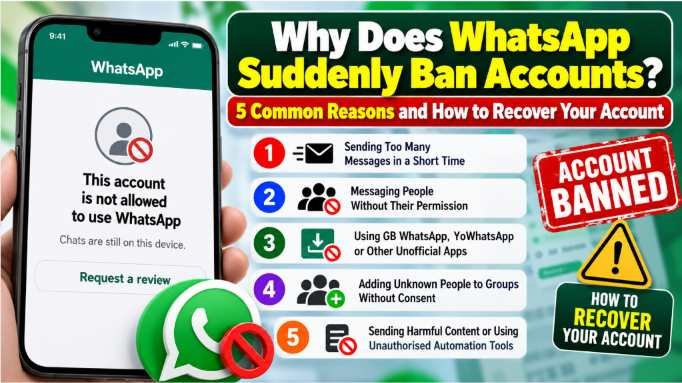
Here are five common reasons why your WhatsApp account might get banned and the steps you can take to appeal the decision.
Why Does WhatsApp Ban Accounts? 5 Common Reasons
1. Sending Too Many Messages in a Short Time
Sending the same message to a large number of people within a short period can make an account appear to be engaging in spam.
For example, repeatedly forwarding promotional links, sending unsolicited advertisements or messaging numerous unfamiliar contacts may trigger WhatsApp’s anti-spam systems.
Accounts that use bulk-messaging tools to distribute unsolicited content may also face restrictions.
How to avoid it: Send messages to people who expect to hear from you. If you operate a business, use approved messaging features and follow WhatsApp’s business messaging policies.
2. Messaging People Without Their Permission
Sending unsolicited messages to people who have not agreed to receive them can increase the risk of complaints.
If recipients block your number or report your messages, WhatsApp may examine the account’s activity. Reports and blocks do not necessarily result in an automatic ban, but they can be relevant to the platform’s enforcement process.
This is particularly important for businesses that contact potential customers through WhatsApp.
How to avoid it: Obtain permission before sending promotional messages, respect opt-out requests and avoid repeatedly contacting people who have shown no interest in your messages.
3. Using GB WhatsApp, YoWhatsApp or Other Unofficial Apps
Unofficial versions of WhatsApp, including GB WhatsApp and YoWhatsApp, may offer additional themes, privacy settings and customisation features. However, they are not official WhatsApp applications.
Using modified versions can put your account at risk because they may violate WhatsApp’s terms. These applications can also create security and privacy concerns, particularly if their developers’ data-handling practices are unclear.
WhatsApp may restrict accounts that use unsupported applications or services.
How to avoid it: Download WhatsApp or WhatsApp Business through official app stores or WhatsApp’s official website. If you are switching from a modified application, check the official migration instructions before uninstalling it to reduce the risk of losing chat history.
4. Adding Unknown People to WhatsApp Groups Without Consent
Adding people to groups without their permission can lead to complaints, particularly when the group is used for advertising, unsolicited promotions or irrelevant content.
Repeatedly adding unfamiliar contacts or using tools to add large numbers of people may also appear suspicious.
If group members report unwanted messages or the account’s activity violates WhatsApp’s policies, enforcement action may follow.
How to avoid it: Ask people before adding them to groups, share an invitation link when appropriate and remove unwanted promotional activity from your messaging practices.
5. Sending Harmful Content or Using Unauthorised Automation Tools
WhatsApp may take action against accounts involved in scams, impersonation, harassment, threats or other prohibited activities.
Using unofficial bots, automated scripts or third-party tools to send messages at scale can also put an account at risk, particularly when those tools facilitate spam or violate the platform’s policies.
Other suspicious activities, such as attempting to manipulate the service or repeatedly engaging in prohibited behaviour, may also result in restrictions.
How to avoid it: Use legitimate messaging features, avoid misleading claims and impersonation, and do not use unauthorised automation services to send unsolicited messages.
What to Do If Your WhatsApp Account Gets Banned
If you see a message stating that your account is not allowed to use WhatsApp, do not panic. Follow these steps to understand the restriction and determine whether you can recover access.
Step 1: Open WhatsApp and Check the Ban Message
Open the official WhatsApp application and read the notification carefully. The message may indicate that your account has been banned or temporarily restricted.
If you see a countdown timer, follow the instructions displayed in the app. A temporary restriction may expire after the specified period, but you should also stop any activity that could have triggered it.
Step 2: Tap ‘Request a Review’
If the option appears on the ban screen, tap Request a review and follow the instructions.
Explain briefly why you believe the ban may have been a mistake. Include relevant details about your account and any unusual activity you have noticed.
WhatsApp will examine your request and communicate its decision. Review times can vary, so do not assume that every appeal will be resolved within a fixed 24-hour period.
Step 3: Switch to the Official WhatsApp App
If you have been using GB WhatsApp, YoWhatsApp or another modified application, switch to the official version.
Before changing applications, follow WhatsApp’s official guidance on transferring your chat history. Avoid entering verification codes or account credentials into untrusted third-party services.
Step 4: Contact Official WhatsApp Support if Needed
If you cannot submit a review through the app or need clarification about the restriction, use WhatsApp’s official Help Center or support channels.
Never pay an unknown person who promises to remove the ban. Avoid sharing your SMS verification code, two-step verification PIN or other sensitive account information.
Step 5: Understand the Appeal Outcome
If WhatsApp reviews your account and upholds the ban, you may not be able to restore access through the same appeal.
The availability of further support options depends on the circumstances and the instructions provided by WhatsApp. Creating new accounts or repeatedly attempting to bypass restrictions is not a guaranteed solution and may create additional problems.
Can WhatsApp Ban an Account by Mistake?
Automated systems can sometimes flag activity that a user believes is legitimate. For example, a sudden change in messaging behaviour or unusual account activity may prompt additional scrutiny.
If you believe your account has been incorrectly banned, use the in-app review process where available. Provide accurate information and avoid submitting misleading claims.
An appeal does not guarantee reinstatement, but it gives WhatsApp an opportunity to reassess the decision.
How to Keep Your WhatsApp Account Safe
Follow these practical precautions to reduce the risk of restrictions:
- Use only the official WhatsApp or WhatsApp Business application.
- Avoid sending unsolicited bulk messages or repetitive promotional content.
- Obtain consent before contacting people for marketing purposes.
- Ask permission before adding people to groups.
- Avoid suspicious links, scams, impersonation and harmful content.
- Do not use unauthorised bots, scripts or bulk-messaging tools.
- Keep your application updated and protect your account with two-step verification.
- Never share verification codes or your account PIN with strangers.
Conclusion
A WhatsApp account can be banned for several reasons, including spam, unsolicited messaging, the use of unofficial applications, suspicious automation and violations of the platform’s policies. However, a sudden ban does not automatically prove that the account owner has deliberately broken the rules.
If your account is restricted, read the notification carefully, use the available review option and follow WhatsApp’s official instructions. The best way to reduce the risk of future restrictions is to use the official application and communicate responsibly.
Important: WhatsApp’s enforcement decisions depend on the circumstances of each case. Following these precautions can reduce risk, but it cannot guarantee that an account will never be restricted.

