

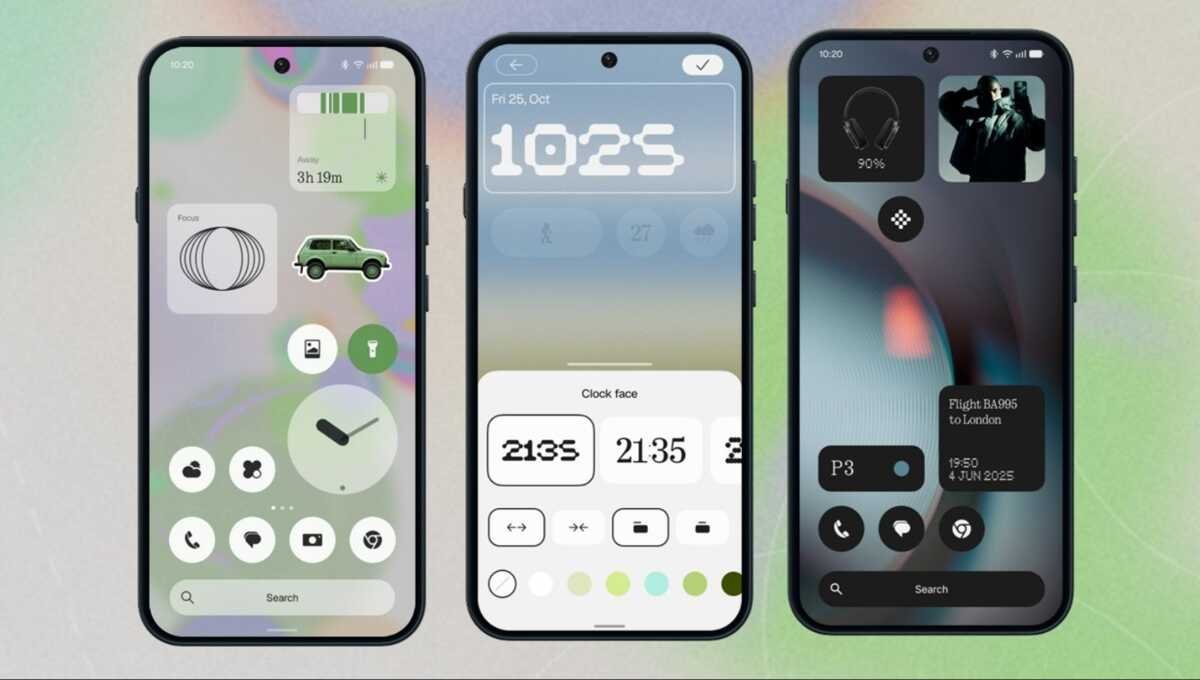
Nothing has begun the stable rollout of Nothing OS 5.0, its latest major software update, starting with the flagship Nothing Phone (3). Announced in August, the new operating system is described as being based on Android 17 and introduces more than 80 changes across interface design, personalisation, performance and artificial intelligence.
The stable release builds on features tested during the Open Beta programme, bringing a redesigned home screen, an updated lock screen clock, improved widgets and enhancements to Essential Space. Nothing has also indicated that the update will expand to additional Nothing and CMF smartphones over the coming months.
As with other major software releases, the rollout is taking place in phases, meaning availability may vary by device and region.
Nothing OS 5.0 Update: What’s New?
Nothing OS 5.0 focuses on making the smartphone experience more personalised, visually consistent and AI-powered. The update combines interface refinements with new utilities and performance improvements.
The key highlights include:
- Redesigned home screen with transparent design elements.
- Adaptive colours that complement the phone’s wallpaper.
- A new Micrographics lock screen clock.
- Improvements to Essential Space and Essential Voice.
- New personalisation widgets and home screen controls.
- Performance and multitasking optimisations.
- Android 17 platform enhancements.
The availability of specific features may depend on the device model and software configuration.
Redesigned Home Screen and Personalisation Features
One of the main changes in Nothing OS 5.0 is its refreshed home screen design. Transparent accents across selected system widgets and the search bar create a more unified visual experience.
An adaptive colour system samples tones from the selected wallpaper to help coordinate the appearance of supported interface elements. This gives users more ways to personalise their devices without manually adjusting every visual detail.
The update also introduces improvements to home screen organisation. Users can move multiple apps and widgets together, making it easier to rearrange layouts and organise frequently used applications.
Two notable additions from the beta cycle are the Collector and Away Time widgets. Collector is designed to help users curate collections of visual items, while Away Time focuses on tracking periods spent away from the screen.
These features add practical personalisation options to the software while maintaining Nothing’s distinctive design approach.
New Micrographics Lock Screen Clock
Nothing OS 5.0 introduces a Micrographics lock screen clock designed to display useful information in a compact layout.
The hardware-inspired design brings together the date, time, current weather conditions and upcoming calendar appointments. This allows users to view key information at a glance without unlocking their smartphones.
The updated lock screen complements the operating system’s broader focus on accessible information, customisation and a cleaner visual presentation.
The exact appearance and availability of lock screen elements may vary depending on the device and configuration.
Essential Space and Essential AI Improvements
Artificial intelligence is another important part of the Nothing OS 5.0 update. The release brings refinements to Essential Space and related tools designed to support everyday productivity.
Essential Voice receives improvements intended to make speech transcription faster and cleaner. This can help users convert spoken information into text more efficiently.
Smart Collections within Essential Space are designed to help organise information, while the Essential Apps Builder introduces an on-device utility that lets users create and deploy custom AI mini-apps using natural-language prompts, according to the supplied announcement.
These features reflect Nothing’s effort to integrate AI more directly into smartphone workflows instead of limiting it to standalone applications.
Essential Space updates are also being distributed through Google Play alongside the operating system rollout. Consequently, some features may depend on separate app updates rather than the OS installation alone.
Nothing OS 5.0 Performance Improvements
Nothing OS 5.0 includes several optimisations intended to improve everyday smartphone performance.
The changes developed during beta testing include better background memory retention, improved touch responsiveness, reduced resource consumption and smoother transitions when switching between apps.
The update also refines interactions involving multitasking and folders. Together, these changes aim to create a more responsive experience during everyday use.
Actual performance improvements may vary depending on the device, installed applications and usage patterns.
Android 17 Features in Nothing OS 5.0
Nothing OS 5.0 is described as being built on Android 17, bringing underlying platform changes alongside Nothing’s own interface and AI enhancements.
According to the supplied information, the update includes improvements in areas such as:
- Notifications and Quick Settings: Independent notification and Quick Settings panels.
- Quick Share: Cross-platform sharing enhancements.
- Privacy: Revised privacy dashboards and controls.
- Recent apps: An updated Recents overview.
- System experience: Platform-level refinements intended to improve usability and consistency.
The availability of individual Android 17 capabilities can depend on the device and the implementation used by Nothing.
Nothing OS 5.0 Rollout: Which Phones Will Get the Update?
The stable Nothing OS 5.0 rollout begins with the Nothing Phone (3). The company says availability will expand to additional Nothing and CMF smartphone models over the coming months.
However, the supplied announcement does not provide a complete list of eligible devices or a confirmed rollout schedule for every model.
Users should check Nothing’s official announcements and support channels for information about their specific smartphone. The timing may differ depending on the model, region and software distribution schedule.
Because the update is being distributed over the air in phases, not every eligible device will receive the notification at the same time.
How to Check for the Nothing OS 5.0 Update
Nothing Phone (3) users can manually check whether the stable software update is available on their devices.
Follow these steps:
- Open Settings on your Nothing smartphone.
- Select System.
- Tap System Update.
- Allow the phone to check for available software.
- If Nothing OS 5.0 is available, follow the on-screen instructions to download and install it.
Before installing a major update, connect to a stable Wi-Fi network, ensure that the battery is sufficiently charged and back up important data.
If the update is not available, check again later. Its absence does not necessarily mean that the device is ineligible; the rollout may simply not have reached it yet.
Nothing OS 5.0 Update: What to Expect
Nothing OS 5.0 brings a combination of visual refinements, personalisation tools, performance improvements and AI-focused utilities. The redesigned home screen, Micrographics lock screen clock and Essential Space enhancements are among its main highlights.
Starting with the Nothing Phone (3), the stable release is expected to expand to additional Nothing and CMF smartphones over the coming months. Users will need to wait for official device-specific announcements to confirm eligibility and timing.
For Nothing Phone (3) owners, the update offers a refreshed software experience with new ways to organise information, customise the interface and use AI-powered tools in everyday tasks.
Disclaimer: The features and rollout details in this article are based on the supplied announcement. Device eligibility, regional availability and individual feature support may vary. Refer to Nothing’s official release notes for the latest confirmed information.

